20 specialty templates, eight designs each
Every template is a full multi-page site written for that kind of practice. Each design restyles the same pages, copy and photos.
Pick a template written for your specialty, choose one of eight designs, replace the sample content with your own words and photos, and click Publish. No code, no developer, no waiting on an invoice.
No credit card required · 14-day free trial · Cancel anytime
Illustrative preview. A clinic website appears section by section: header, hero, services and an enquiry form with a consent checkbox. The badge in the address bar then changes from Draft to Live. Use the buttons below to see the same page in Sanctuary, Atelier, Neighbourhood, Practitioner, Calm, Care Finder, Heritage and Pulse.
Illustrative preview. Same content, eight designs. Your site carries your own words and photos.
Zilo Pages in short
Zilo Pages is a clinic and hospital website builder for doctors in India. You pick a template written for your specialty, choose one of eight designs, replace the sample content with your own words and photos, and click Publish. No code or developer is needed, and the site goes live on a free zilo.care address.
The website nobody updates
A stale, hard-to-use site sends them to the clinic that has a better one. Zilo Pages gives you a site you can keep current yourself.
Without Zilo Pages: A patient searches your clinic on their phone and lands on a brochure from years ago that barely fits the screen.
With Zilo Pages: Your site is built to read well on a phone, and the editor opens on the phone view so you check it the way patients are likely to see it.
Without Zilo Pages: A doctor's timings change, and fixing the website means emailing an agency and waiting for the next invoice.
With Zilo Pages: You open the section, change the words and click Publish. Nothing is public until you publish, so you can try edits safely.
Without Zilo Pages: Messages from the contact page land in an inbox somebody checks once a week.
With Zilo Pages: Every message is saved in your enquiry inbox, and your billing contact (or your admins) is emailed for each new one.
From blank to live
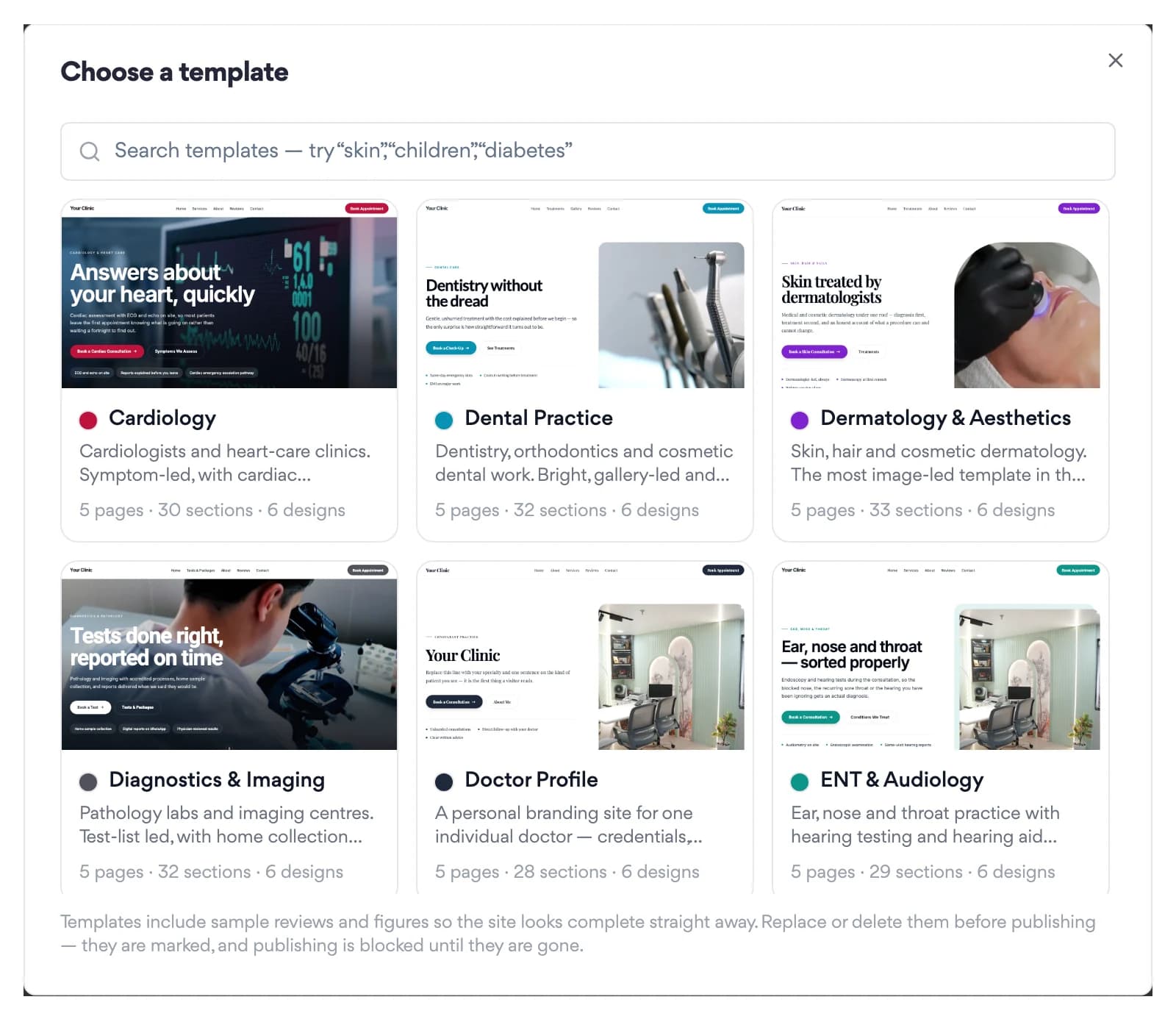
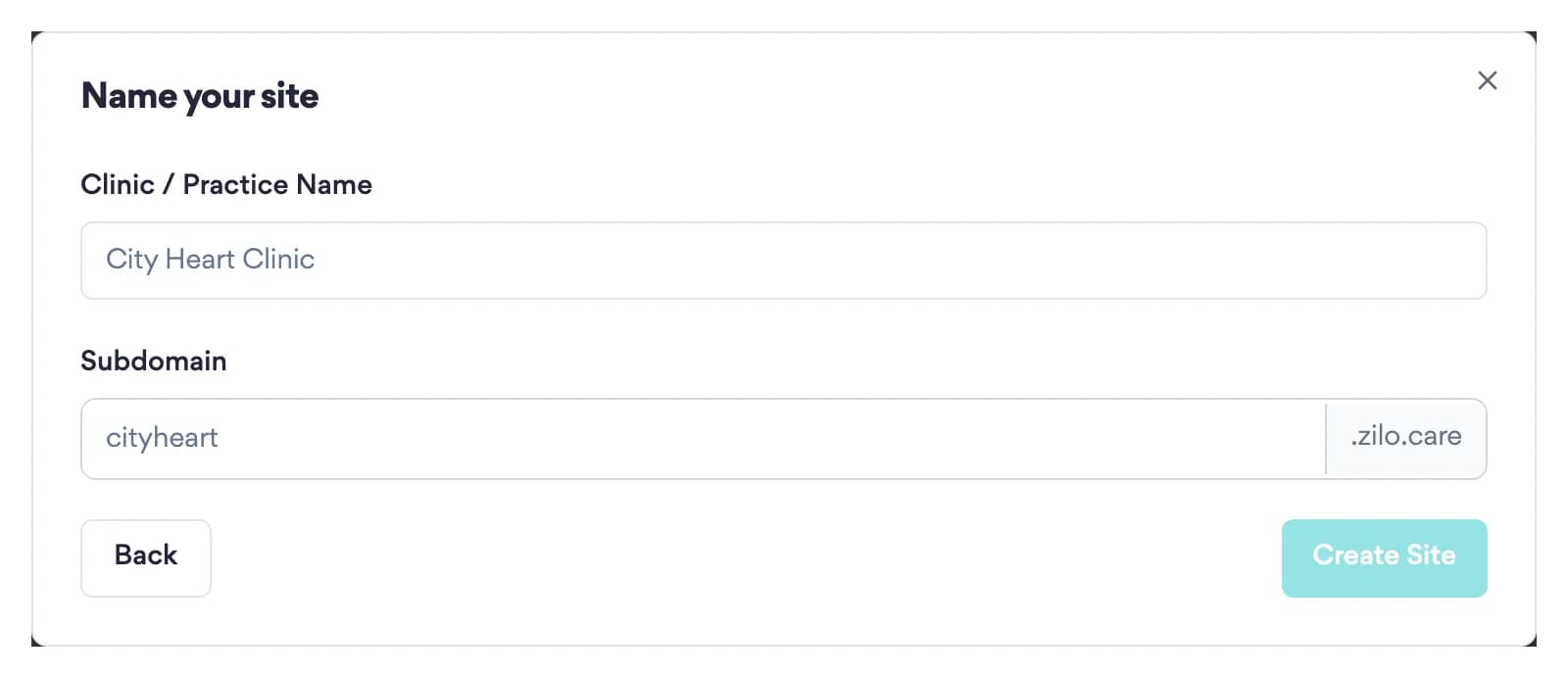
Every template is a complete multi-page site, with healthcare sample content already in place. Choose a design, name your site and you land straight in the editor.
Each page shows an SEO score and an AEO (AI-engine) score with specific suggestions. Your sitemap, robots.txt and llms.txt are built from your published pages, so they never fall out of date.
Search and AI files, built from your published pages
sitemap.xml
Every published page and blog post
robots.txt
Welcomes crawlers and points them at the sitemap
llms.txt
A one-line summary per page, for AI answer engines
You work on a draft. A manager or admin clicks Publish and the site is live on a free zilo.care address. Unpublish takes it offline without deleting anything.
Publish is blocked: 2 sections still contain sample content
Make one real edit in each, or delete the section, then publish.
Your own domain, on plans that include it
Add two records at your registrar. We verify ownership, then our team activates it.
Add a Contact Form section and each submission is stored in your enquiry inbox with the time consent was given. Your billing contact, or your admins, get an email for each new one.
What's inside
Every template is a full multi-page site written for that kind of practice. Each design restyles the same pages, copy and photos.
Hero, services, doctors, process steps, FAQ, contact form, map and more. Move a section with the arrows, or switch its layout without touching your text.
Upload photos and PDFs once and reuse them across every site in your organisation. A linked PDF always downloads, so patients keep a copy.
sitemap.xml, robots.txt and llms.txt are generated from your published pages on every request. There is no hand-edited copy to drift out of date.
Off by default for each site. Write drafts in Markdown with live SEO and AEO scores; a manager or admin decides what goes public.
Add a Book Appointment button that points to your booking page, and your Zilo Chat assistant as a ready-made section (with a Zilo Chat subscription).
Pageviews, unique visitors, Book clicks and referrers. Visits are counted by Zilo Pages itself, with no third-party tracking script and no cookie.
Eight designs
Pick a design when you create the site. Pages, copy and photos stay the same; the brand colour can be changed later in Site Settings.
Sanctuary
Warm and editorial, with one italic word
Atelier
Quiet and precise, square corners
Neighbourhood
Friendly and local, with arched photos
Practitioner
Led by the doctor, credentials up front
Calm
Soft and unhurried, nothing floating
Care Finder
Built to get a patient booked
Heritage
Established, with a labelled phone bar
Pulse
Bold colour blocks, modern and direct
Getting started
Choose one of 20 templates and one of eight designs, then name your site. A manager or admin creates it, and a subdomain is suggested for you.
Replace the sample text and photos section by section, check each page's SEO score and look at the phone view. Sections with sample claims must be edited or removed first.
Your site goes live on its free zilo.care address. Add your own domain later if your plan includes one.
Your free address, the moment you publish
your-clinic.zilo.care
Illustrative. You choose your own subdomain when you create the site.
Honest by design
Zilo Pages is built so that a rushed template cannot put claims in your name.
Testimonials, Stats, Awards, Before & After, Pricing and Insurance Partners sections start with sample content. Publish is refused until you edit or delete each one, and the check runs on the server.
The contact form carries a consent checkbox, and the server rejects any submission without consent. The time of consent and the version of the text are stored with it.
Template photographs show rooms and equipment, never a portrait standing in for your doctors. Doctor and team photos stay blank until you upload your own.
Taking the site offline shows visitors a simple coming-soon page. Your pages, sections, photos and settings stay exactly as you left them.
Pricing
14-day free trial on every plan. No credit card required.
1 site on yourclinic.zilo.care · up to 10 pages · all 23 section components
Up to 3 sites · up to 30 pages each · 1 custom domain
A clinic website builder lets a doctor or hospital create and update a website without code or a developer, usually from ready-made templates. Zilo Pages offers 20 specialty templates in eight designs, edited section by section with a phone preview, and publishes the site on a free zilo.care address when you click Publish.
Choose a builder with templates for your specialty, replace the sample text and photos with your own, check how it looks on a phone, then publish. With Zilo Pages you pick one of 20 templates and a design, edit each section, check every page's SEO score, and click Publish. You can connect your own domain later on plans that include one.
A website isn't required, but patients often look a clinic up before calling, and it gives you somewhere to publish timings, doctors, services and contact details. Keep the content factual, as Indian rules limit how doctors can advertise. Zilo Pages won't publish sample testimonials, stats or awards until you have edited or removed them.
Include who you are and what you treat, your doctors, timings, an address with a map, ways to book or call, and answers to common questions. Zilo Pages templates are built from sections such as hero, services, doctors, FAQ, contact form and map, which you can reorder or switch to another layout without retyping the text.
No. Everything is point-and-click. Pick a template, click into a section to edit text or upload an image inline, reorder sections with a click, and hit Publish.
Yes, on the Practice plan and up — attach your own domain from your site's settings. We verify ownership with a DNS record, then provision it on our end; we're provisioning your domain, usually within one business day. Every site also gets a free yourclinic.zilo.care subdomain that's fully SEO-indexed and shareable from day one, so you're never blocked while your domain is provisioning.
If you already have Zilo Consult or Reputation Engine, the Book Appointment button and Reviews widget are one-toggle integrations — no API keys, no setup. They pull live data the moment you enable them.
Yes. Every contact form ships with a mandatory explicit-consent checkbox; the consent text and version are stored per submission for audit purposes. Form leads route into your Zilo Growth Engine contact list with full receipt logging.
Per-page meta titles, descriptions, canonical URLs, and Schema.org markup (MedicalOrganization, Physician, FAQPage, WebSite, BreadcrumbList) are built in. We auto-generate your sitemap.xml and robots.txt. Pages are server-rendered with optimised images, which supports faster load times and better local search ranking.
Start a free trial, pick a template and watch your clinic's site take shape. Nothing goes public until you click Publish.
14-day free trial · No credit card required · Cancel anytime